MEPCO Bill Payment Methods : All Online and Offline 2026
MEPCO bill payment is now something you can complete in under a minute from your phone, yet many consumers in South Punjab still stand in long queues at banks to clear their electricity dues. Whether you prefer the traditional counter or a mobile wallet, there is a method that fits you.
This guide covers every current way to pay your Multan Electric Power Company bill — banks, post offices, service centers, mobile apps, ATMs, and credit cards. You will also see the benefits of paying online, what happens if you miss the due date, and answers to the most common questions.
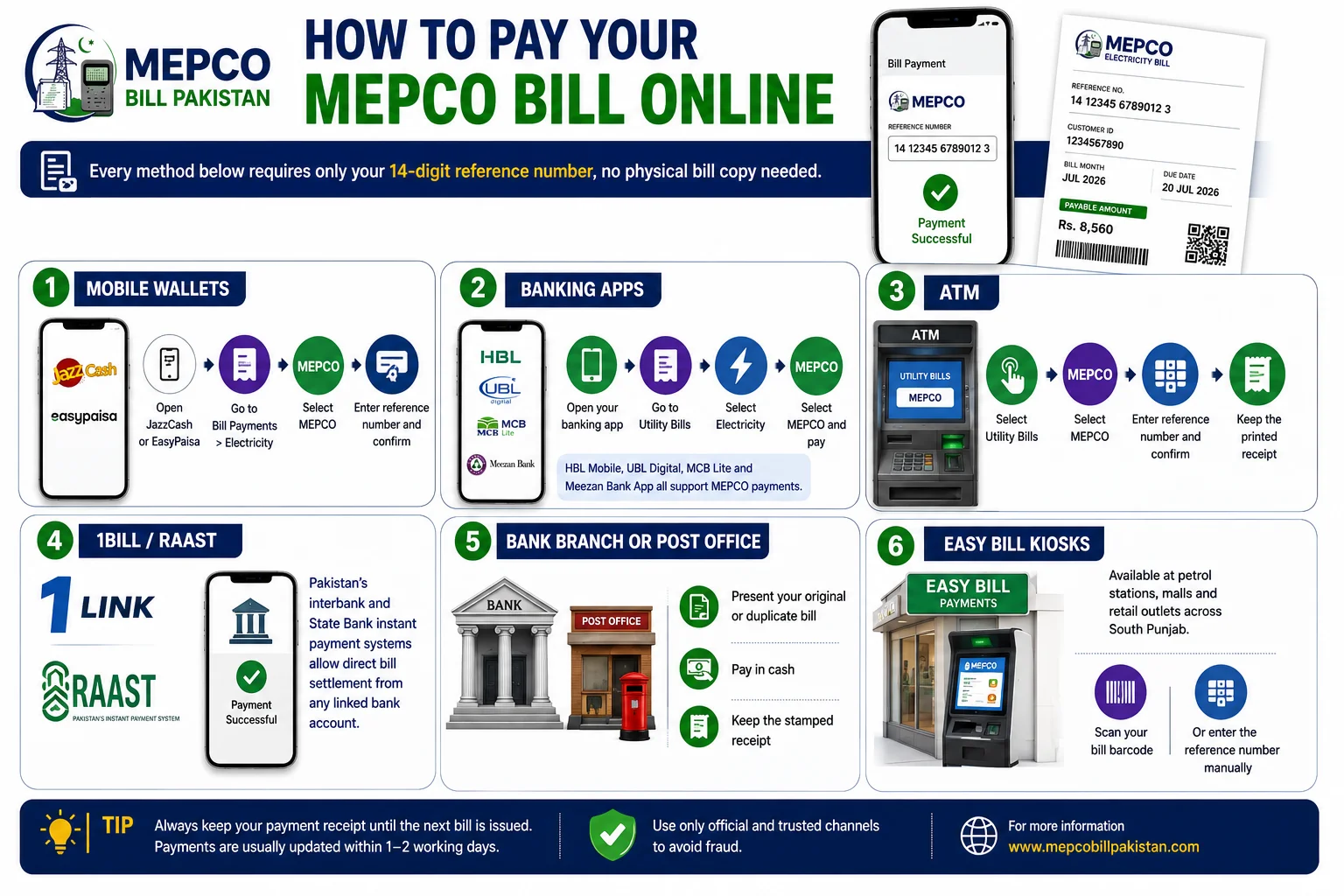
All you really need to get started is your 14-digit reference number, printed at the top of your monthly bill. Keep it handy, because every method below asks for it.
Traditional Methods of Payment
For people who prefer paying in person or do not use smartphones, MEPCO still supports over-the-counter payment across its 13 districts, from Multan to Rahim Yar Khan.
With Banks
Almost all authorized commercial banks in Pakistan accept electricity bills at their counters. Take your printed bill to any designated bank branch, hand it to the teller, pay the amount in cash, and collect your stamped receipt.
- Carry the original paper bill (not a photo) for counter payment.
- Pay at least one day before the due date, as counter payments can take up to 24 hours to reflect.
💡 Tip: Keep the stamped bank receipt until your next bill arrives. It is your only proof if a payment is not recorded on time.
Post Offices
Pakistan Post branches also collect utility bills, which is useful in smaller towns and rural union councils where bank branches are limited. The process is the same: present the bill, pay in cash, and get a receipt.
⚠️ Warning: Post office and bank systems may not update instantly. Never pay a bill on its due date through these channels, or you risk a late surcharge even after paying.
Service Centers
MEPCO’s own Customer Service Centers accept payments and also handle complaints, meter issues, and bill corrections. If your bill has an error you want fixed before paying, the service center is the right place to go, since staff can verify your reading and reference number on the spot.
Modern Methods of Payment
Digital channels have made MEPCO bill payment instant, and most confirmations arrive within seconds. Below are the options most people in Pakistan now use.
Mobile Apps of All Banks
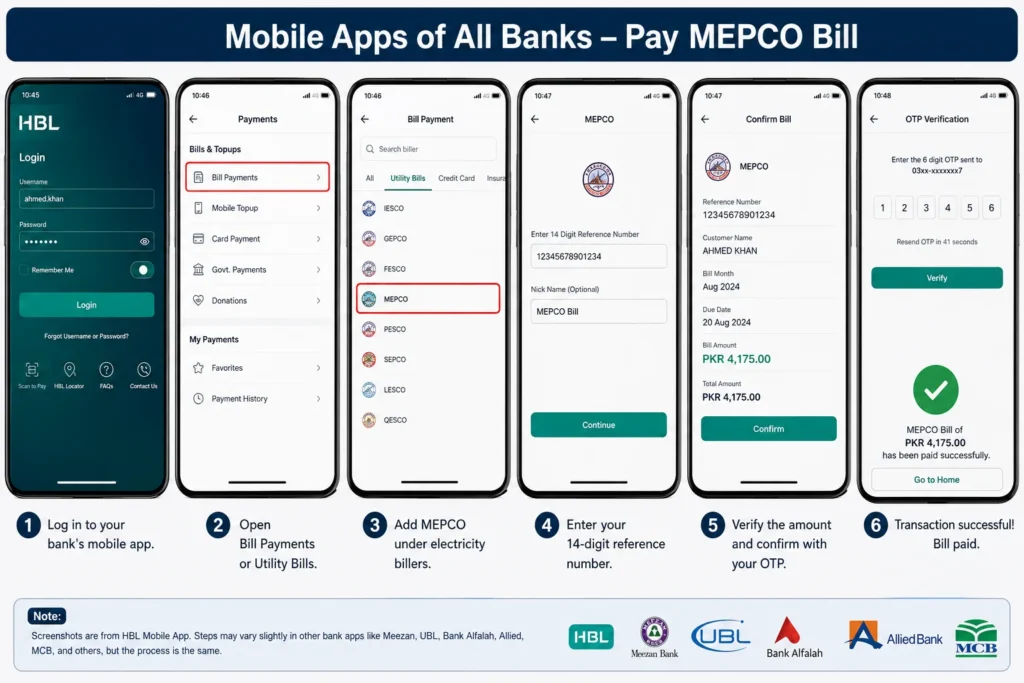
Every major bank — HBL, Meezan, UBL, Bank Alfalah, Allied, MCB, and others — lets you pay through its app.
- Log in to your bank’s mobile app.
- Open Bill Payments or Utility Bills.
- Add MEPCO under electricity billers.
- Enter your 14-digit reference number.
- Verify the amount and confirm with your OTP.
ATMs of All Banks
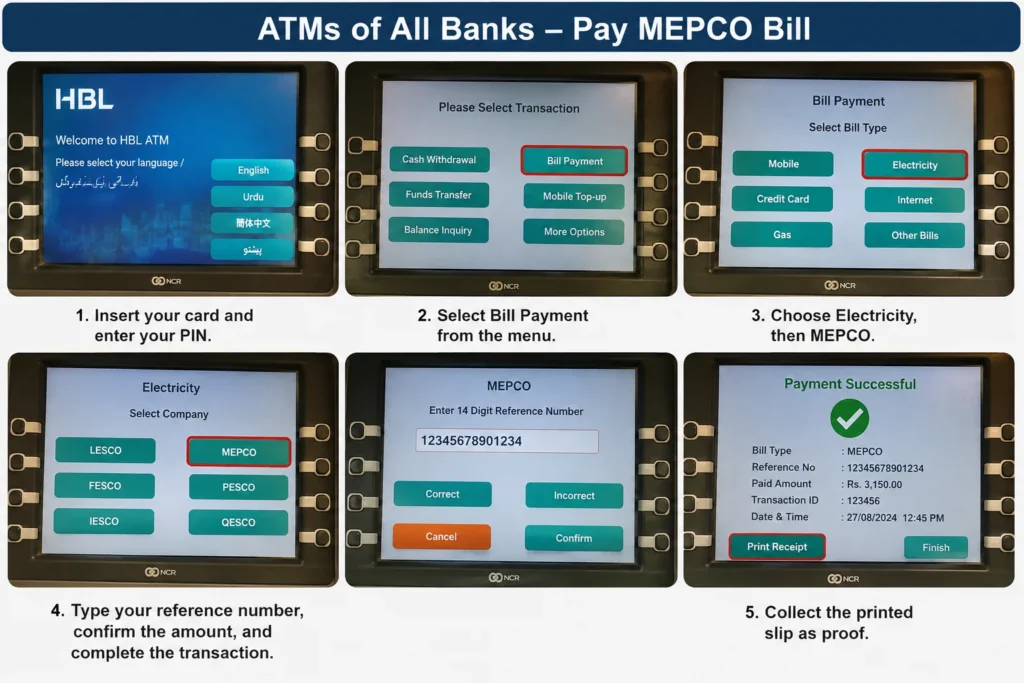
If you prefer a card, any bank ATM can clear your dues.
- Insert your card and enter your PIN.
- Select Bill Payment from the menu.
- Choose Electricity, then MEPCO.
- Type your reference number, confirm the amount, and complete the transaction.
- Collect the printed slip as proof.
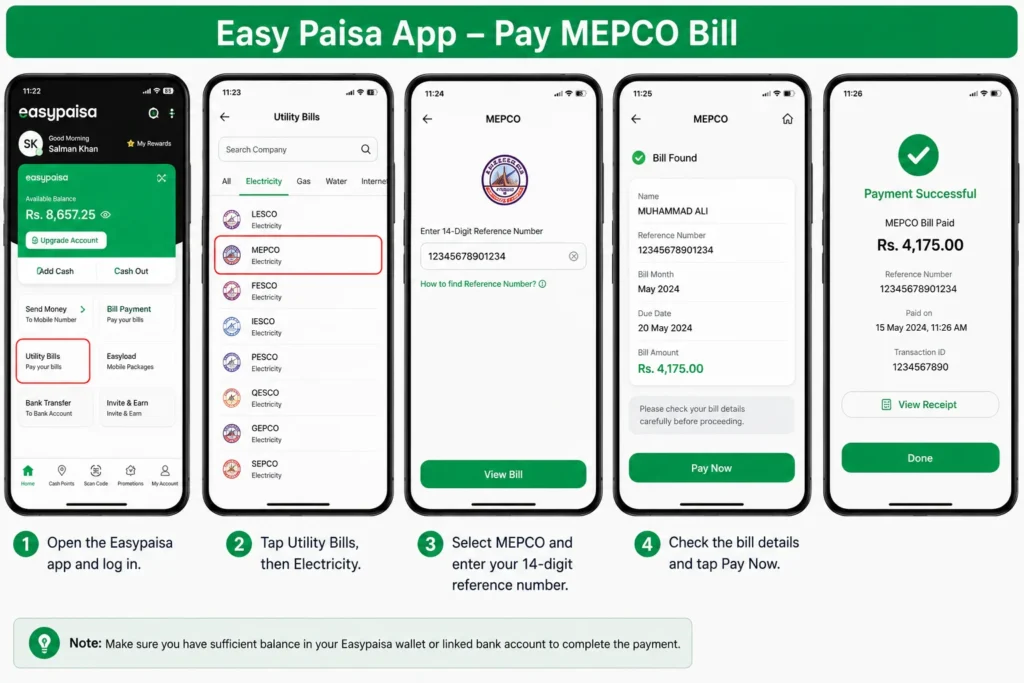
Easy Paisa App
Easypaisa is one of the most widely used wallets for utility bills in Pakistan.
Process
- Open the Easypaisa app and log in.
- Tap Utility Bills, then Electricity.
- Select MEPCO and enter your 14-digit reference number.
- Check the bill details and tap Pay Now.
💡 Tip: The app saves your reference number, so next month you can repeat the payment with a single tap.
Jazz Cash App
JazzCash works almost identically and is convenient for Jazz users.
- Open JazzCash and log in.
- Go to Utility Bills and choose Electricity.
- Pick MEPCO and enter the reference number.
- Verify and tap Pay Now.
NayaPay App
NayaPay is a newer digital wallet popular with younger users and freelancers.
- Open the NayaPay app and sign in.
- Select Utility Bills, then Electricity.
- Choose MEPCO and enter your reference number.
- Confirm the details and complete the payment.
SadaPay App
SadaPay offers a clean, card-linked payment flow.
- Open SadaPay and tap Payments.
- Go to Bills & Utilities and pick MEPCO as the biller.
- Enter your 14-digit reference number.
- Tap Pay, then confirm with your PIN or fingerprint.
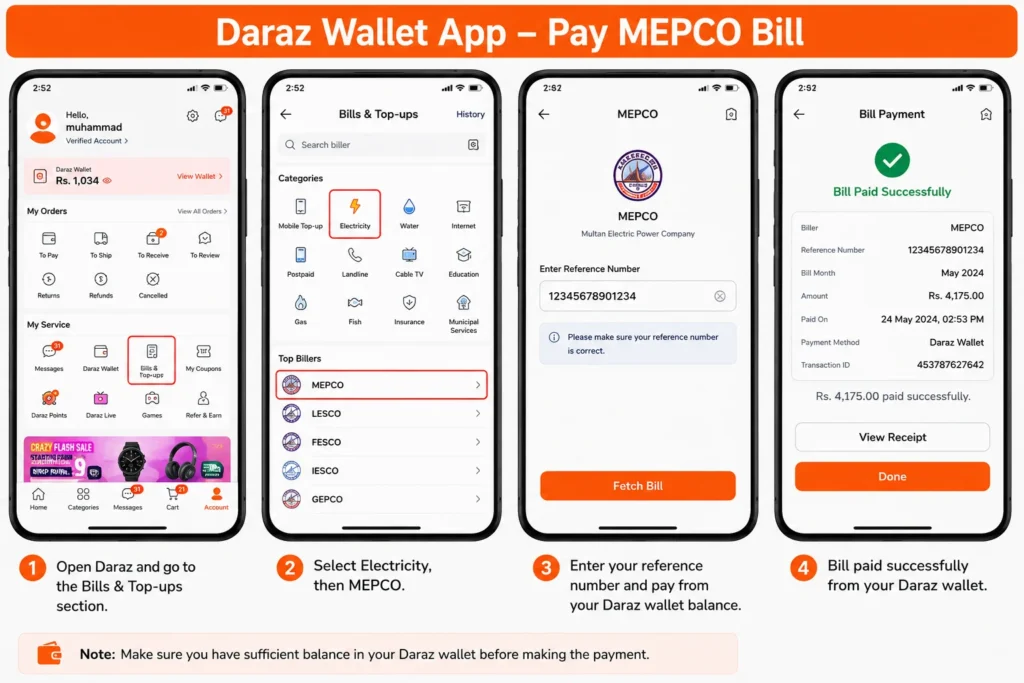
Daraz Wallet App
Daraz users can clear utility bills straight from the Daraz app wallet.
- Open Daraz and go to the Bills & Top-ups section.
- Select Electricity, then MEPCO.
- Enter your reference number and pay from your Daraz wallet balance.
⚠️ Warning: Only use official apps downloaded from Google Play or the App Store. Fake utility-payment apps are common in Pakistan and can steal your details.
MEPCO Bill Payment Through Credit Card
You can pay by credit card through your bank’s app, internet banking, or 1LINK-enabled portals that list MEPCO as a biller. Add MEPCO, enter the reference number, choose your credit card as the payment source, and confirm with the OTP.
💡 Tip: Some banks charge a small convenience fee or treat utility payments as a cash-type transaction. Check your card terms first so you are not surprised by extra charges.
Benefits of Online Payments of Bills
Paying online has clear advantages over the counter:
Speed — most transactions confirm within seconds.
24/7 access — pay at midnight or on public holidays.
No queues — no travel or waiting at a branch.
Instant digital proof — a screenshot or in-app receipt is stored automatically.
Reminders — apps notify you before the due date, reducing missed payments.
Safety — no need to carry cash to a branch.
Late Payments
If you miss the due date, MEPCO adds a late payment surcharge to your next bill. Continued non-payment can lead to a disconnection notice, and once disconnected you may have to pay outstanding dues plus a reconnection charge to restore supply.
- Pay one day early if using banks, post offices, or ATMs, since these can take time to update.
- If a payment does not reflect within 24 hours, contact the MEPCO helpline at 0800-63726 with your receipt.
Conclusion
You now have every current option to clear your electricity dues, from bank counters and post offices to Easypaisa, JazzCash, NayaPay, SadaPay, Daraz, ATMs, and credit cards. For most people, a mobile wallet or bank app is the fastest and safest route, while service centers remain useful when a bill needs correcting first.
Keep your 14-digit reference number saved, pay a day or two before the due date, and always store your receipt. Doing this keeps your supply running and helps you avoid late surcharges entirely.