MEPCO Bill Online 2026 Check Download and Pay 2026
Need to check your MEPCO bill online right now? You’re in the right place — enter your 14-digit reference number or 10-digit consumer ID below and your current bill amount, due date, and units consumed will appear instantly, free of cost.
No account, no login, and no office visit required. Whether you want to see how much you owe this month, download a duplicate copy for your records, or figure out why your bill increased, everything you need is on this single page.
Below you’ll also find how to check your bill via SMS without internet, what every charge on your bill actually means, how to pay online through JazzCash or Easypaisa, and what to do if you get a “Bill Not Found” error — so you leave this page with your query fully resolved.
H1: MEPCO Bill Online 2026 Check Download and Pay 2026
H2: What Is MEPCO Bill Online
H3: What Is MEPCO and Which Areas It Covers
H3: How Your MEPCO Bill Is Generated — From Meter Reading to Final Bill
H2: Difference Between 14-Digit Reference Number and 10-Digit Consumer ID
H2: How to Check MEPCO Bill Online Step by Step
H3: Step by Step MEPCO Online Bill Check by Reference Number
H2: How to Check MEPCO Bill Using Consumer ID
H2: How to Find Your Reference Number or Consumer ID If You Lost It
H2: How to Check MEPCO Bill Without Internet
H3: MEPCO Bill Check via SMS
H3: How to Get Your MEPCO Bill Automatically via SMS or Email Subscription
H3: Can You Check MEPCO Bill by CNIC
H2: How to Download and Print Your MEPCO Duplicate Bill
H3: Step by Step Download MEPCO Bill as PDF
H3: How to Print Your MEPCO Bill
H3: How to Check MEPCO Old Bill History
H2: Understanding Every Charge on Your MEPCO Bill
H3: MEPCO Bill Calculator — How to Estimate Your Bill
H3: FPA GST TV Fee and TR Surcharge Explained
H3: Deferred Amount FC Surcharge QTR Adjustment and Pro Rata Consumption
H2: MEPCO Peak Hours and How to Reduce Your Bill
H3: MEPCO Peak Hours by Season — Full Time Table
H3: Tips to Lower Your Electricity Bill During Peak Hours
H2: How to Pay Your MEPCO Bill Online
H3: Pay via JazzCash
H3: Pay via Easypaisa
H3: Pay via Bank Apps and ATM
H3: Pay via Over the Counter at Banks and Pakistan Post
H2: MEPCO Bill Correction Complaints and Solar Net Metering
H3: How to Report a Wrong Meter Reading Overbilling or Low Voltage
H3: MEPCO Helpline and Regional Complaint Numbers by City
H3: MEPCO Net Metering for Solar Panel Owners
H2: MEPCO Bill Installment and Due Date Extension
H3: How to Apply for MEPCO Bill Installments
H4: MEPCO Bill Installment Limits by Bill Amount
H3: How to Request a Due Date Extension
H2: Frequently Asked Questions About MEPCO Bill Online
H2: Conclusion
H2: Important pages
What Is MEPCO Bill Online?
MEPCO bill online is the official digital system that lets consumers view, download, and print their electricity bill without visiting a MEPCO office. Enter your 14-digit reference number or 10-digit consumer ID, and your latest bill displays instantly with the payable amount, due date, billing month, and total units consumed.
What Is MEPCO and Which Areas It Covers?
MEPCO is responsible for distributing energy to 13 districts of south Punjab. It manages 672 feeders, 786 grid stations, and more than 82,000 km of power lines. The company purchases electricity from WAPDA Hydel, HUBCO, and private independent power producers to meet the energy needs of its consumers.
MEPCO covers these major cities and districts:
|
Region |
Cities Covered |
|---|---|
|
Central |
Multan, Khanewal, Lodhran |
|
South |
Rajanpur, D.G. Khan, Muzaffargarh |
|
East |
Bahawalpur, Bahawalnagar, R.Y. Khan |
|
North |
Sahiwal, Pakpattan, Vehari, Layyah |
How Your MEPCO Bill Is Generated — From Meter Reading to Final Bill?
Every month MEPCO takes readings of electricity consumption during the billing period, calculates the bills on the basis of tariff rates, and determines the amount to be paid. The complete process follows these stages:
Step 1: Meter reading — MEPCO officials or automated smart meters record consumption for each consumer
Step 2: Unit calculation — total units consumed during the billing period are calculated
Step 3: Tariff application — the applicable tariff rate based on your consumer category (residential, commercial, or industrial) is applied
Step 4: Addition of taxes and surcharges — FPA, GST, TV fee, and other applicable charges are added
Step 5: Bill generation — a detailed bill is generated showing units consumed, payable amount, due date, and a full charge breakdown
Step 6: Distribution — bills are made available through online portals, SMS, and physical delivery
💡 Tip: The bill now includes a picture of your meter so you can verify how many units you actually consumed during the billing month — a useful feature for spotting reading errors early.
Difference Between 14-Digit Reference Number and 10-Digit Consumer ID
Both numbers can be used to check your bill, but they serve slightly different purposes:
|
Feature |
14-Digit Reference Number |
10-Digit Consumer ID |
|---|---|---|
|
Location on bill |
Printed at the top, highlighted in red |
Printed beneath the reference number |
|
Changes over time |
Yes, changes with each new billing cycle in some cases |
Stays fixed to your connection permanently |
|
Best for |
Checking the current month’s exact bill |
General account identification |
|
Used for |
Online bill check, SMS check, app check |
New connection tracking, complaint registration |
⚠️ Warning: The most common mistake is confusing 0 (zero) with O (letter) or missing leading digits when entering your reference number. Always copy the number carefully from your physical bill.
How to Check MEPCO Bill Online Step by Step?
Step by Step MEPCO Online Bill Check by Reference Number
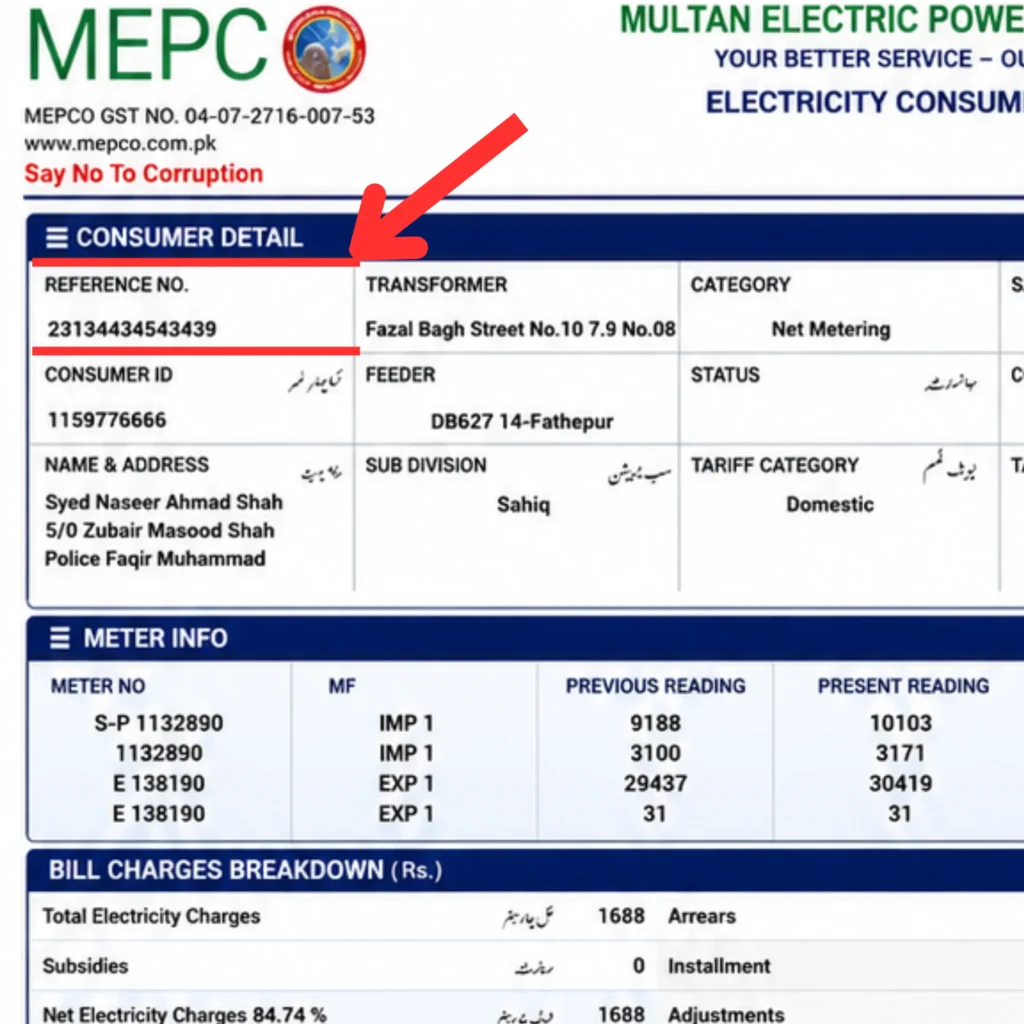
The easiest and most accurate way to check your bill online is by using your 14-digit reference number, which is printed clearly on your electricity bill.
Step 1: Open your browser and go to the official MEPCO online bill portal
Step 2: Locate your 14-digit reference number on your latest or previous bill — it appears in a highlighted box, usually on the top left
Step 3: Enter the number in the bill check field
Step 4: Click the Generate Bill or Check Bill button
Step 5: Your complete bill displays instantly with payable amount, due date, billing month, units consumed, and applied taxes
How to Check MEPCO Bill Using Consumer ID?
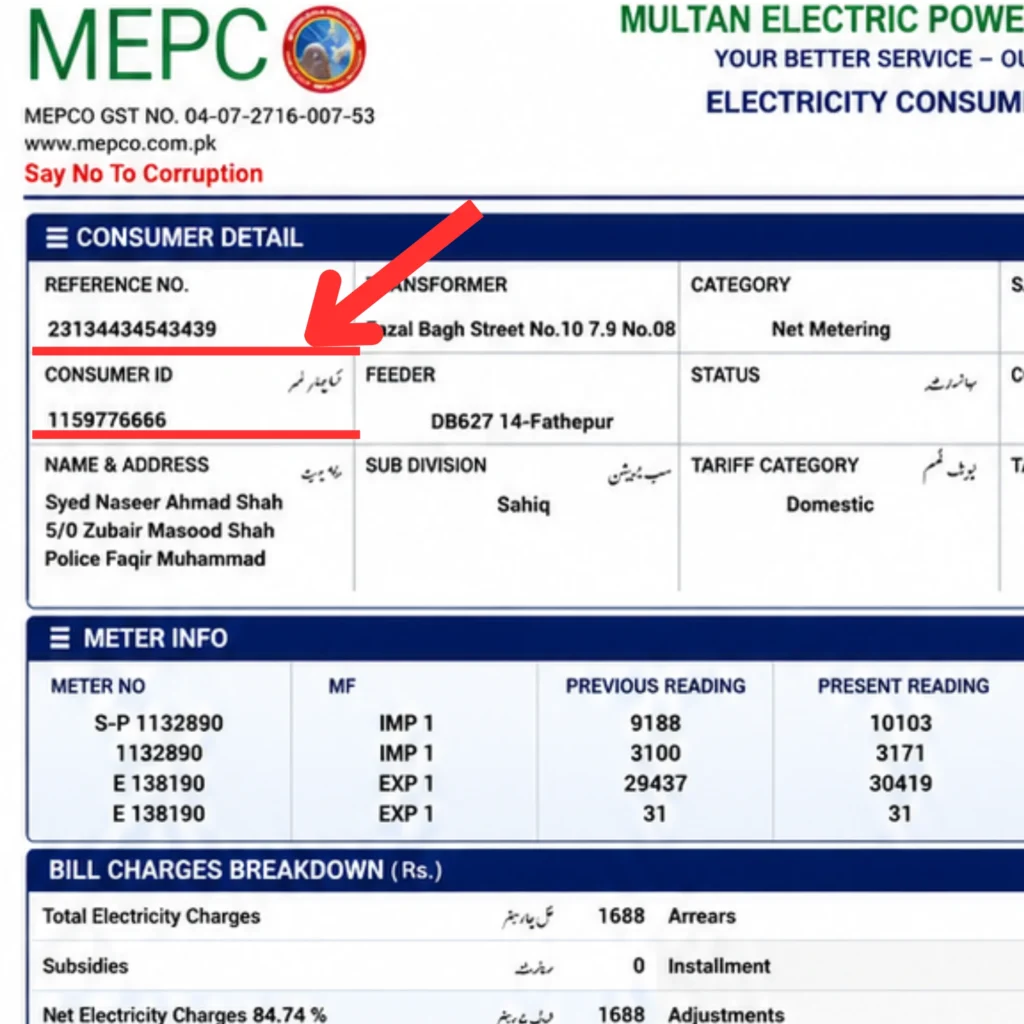
If you don’t have your 14-digit reference number, you can check your bill online using your 10-digit Consumer ID.
Step 1: Select Customer ID from the input field options on the bill check form
Step 2: Enter your 10-digit Consumer ID
Step 3: Click Submit or View Full Bill
Step 4: Your bill appears instantly, and you can download or print it for your records
How to Find Your Reference Number or Consumer ID If You Lost It?
If you have lost your reference number and don’t have any MEPCO previous bill at hand, there are three reliable ways to recover it:
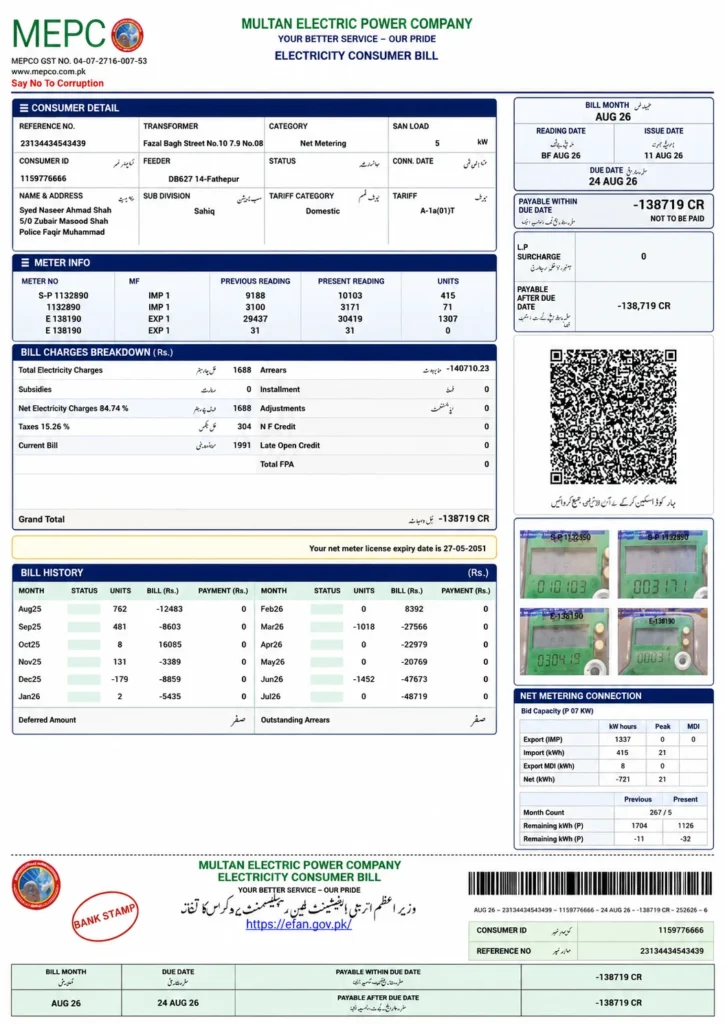
Method 1 — Old bills: Check any previous physical bill — both numbers are printed clearly on the left side
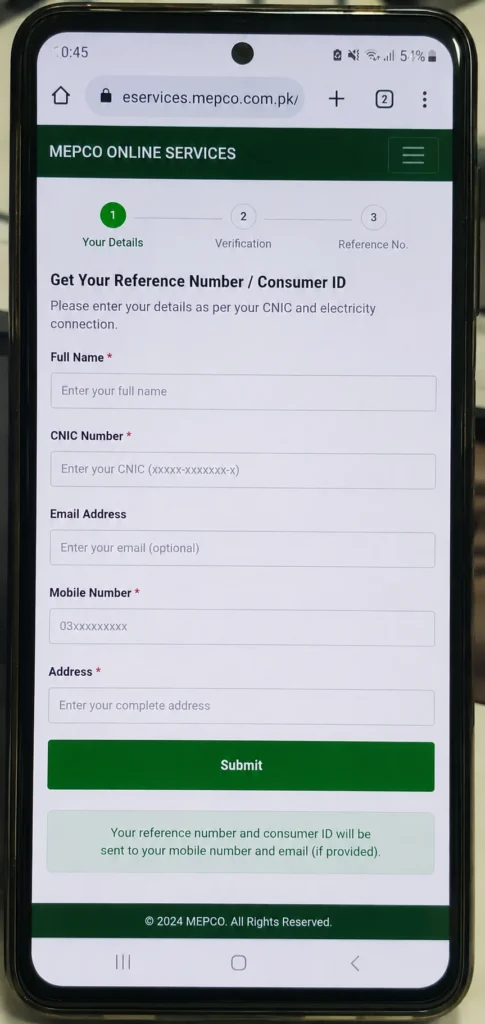
Method 2 — Online portal: Provide your name, ID card number, and address on the official portal to retrieve your reference number and consumer ID
Method 3 — Customer Service Centers: Visit your nearest MEPCO customer service center with your CNIC — staff will provide your reference number and consumer ID after verifying your details
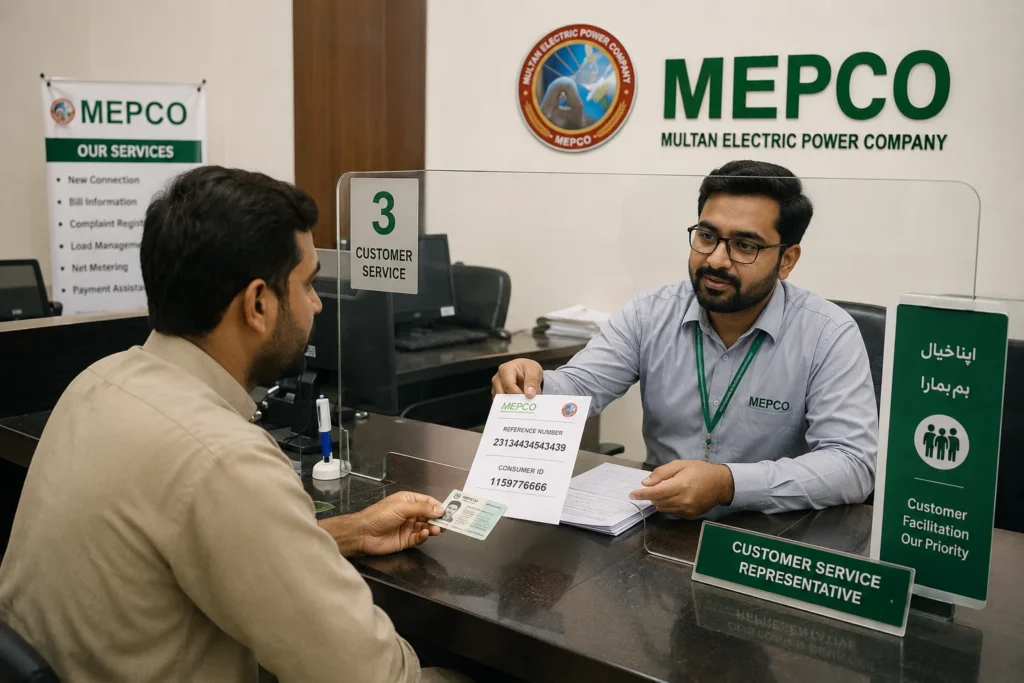
💡 Tip: When you install a new connection, keep your first bill safely — it contains your reference number and customer ID which you will need for every future online bill check.
How to Check MEPCO Bill Without Internet?
MEPCO Bill Check via SMS
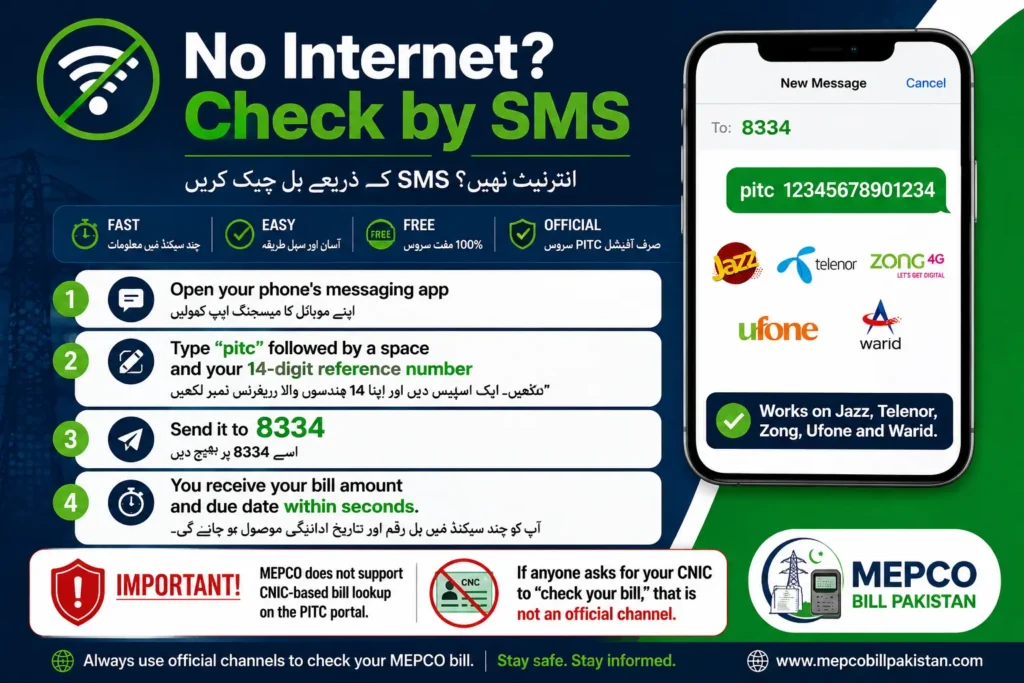
If you have limited internet access, MEPCO offers a completely free SMS bill check service.
Step 1: Open the messaging app on your phone
Step 2: Type: PITC (space) your 14-digit reference number — for example: PITC 20151744038540
Step 3: Send this message to 8334
Step 4: Within a few seconds you will receive an SMS with your complete bill details including amount, due date, and payment status
This service works on all Pakistani mobile networks — Jazz, Zong, Telenor, and Ufone — and standard SMS charges apply.
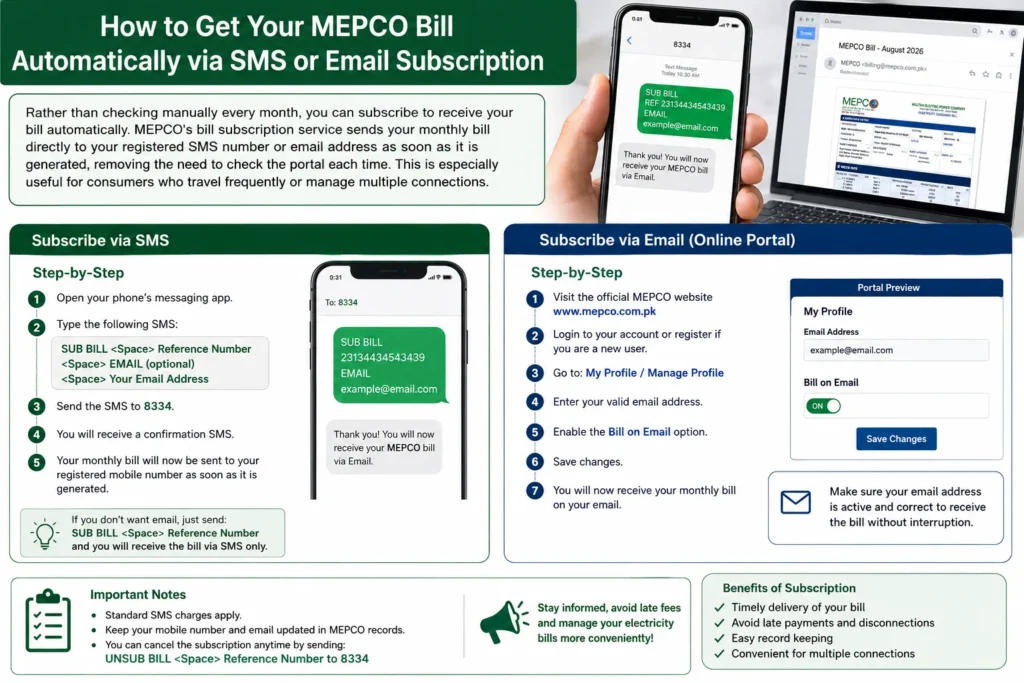
How to Get Your MEPCO Bill Automatically via SMS or Email Subscription?
Rather than checking manually every month, you can subscribe to receive your bill automatically. MEPCO’s bill subscription service sends your monthly bill directly to your registered SMS number or email address as soon as it is generated, removing the need to check the portal each time. This is especially useful for consumers who travel frequently or manage multiple connections.
Can You Check MEPCO Bill by CNIC?
No — MEPCO bills cannot be checked directly by CNIC. MEPCO assigns bills based on reference numbers, not CNICs. Your CNIC is linked to your electricity connection, but bills are generated per meter, making the reference number essential for online checking.
If you only have your CNIC and no bill:
- Visit your nearest MEPCO office and provide your CNIC and registered mobile number to retrieve your bill details
- Use the official MEPCO app, which may allow account linking through registered CNIC details after verification
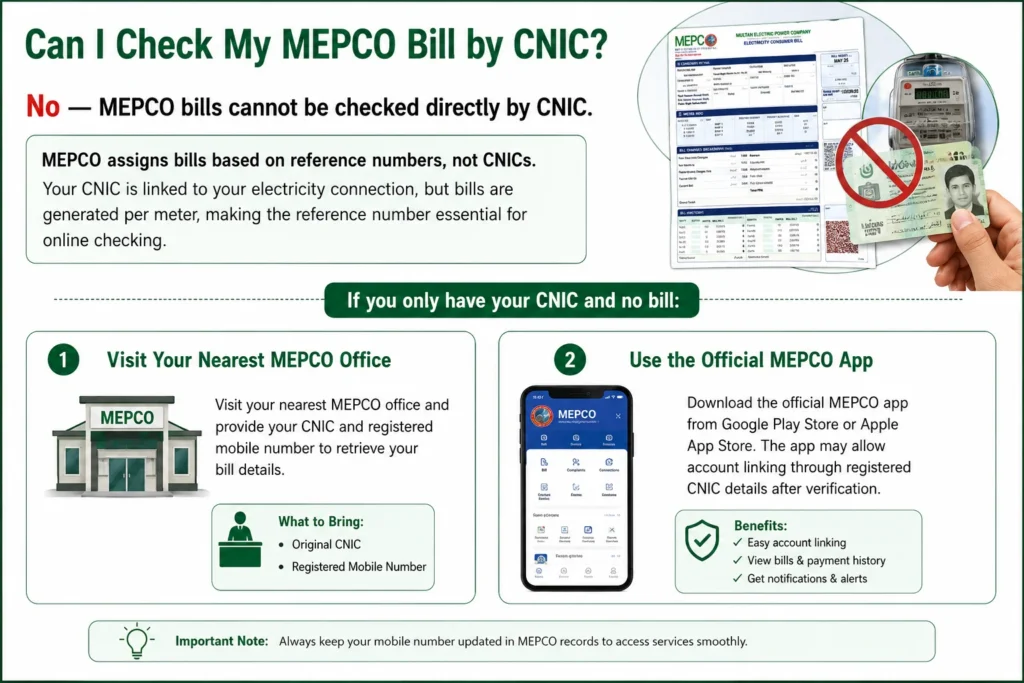
⚠️ Warning: Be cautious of unofficial websites claiming to offer CNIC-based bill checks — MEPCO does not officially support this method, and such websites may not display accurate data.
How to Download and Print Your MEPCO Duplicate Bill?
Step by Step Download MEPCO Bill as PDF
Step 1: Enter your 14-digit reference number in the input field
Step 2: Click the Generate button — your complete bill will appear on screen
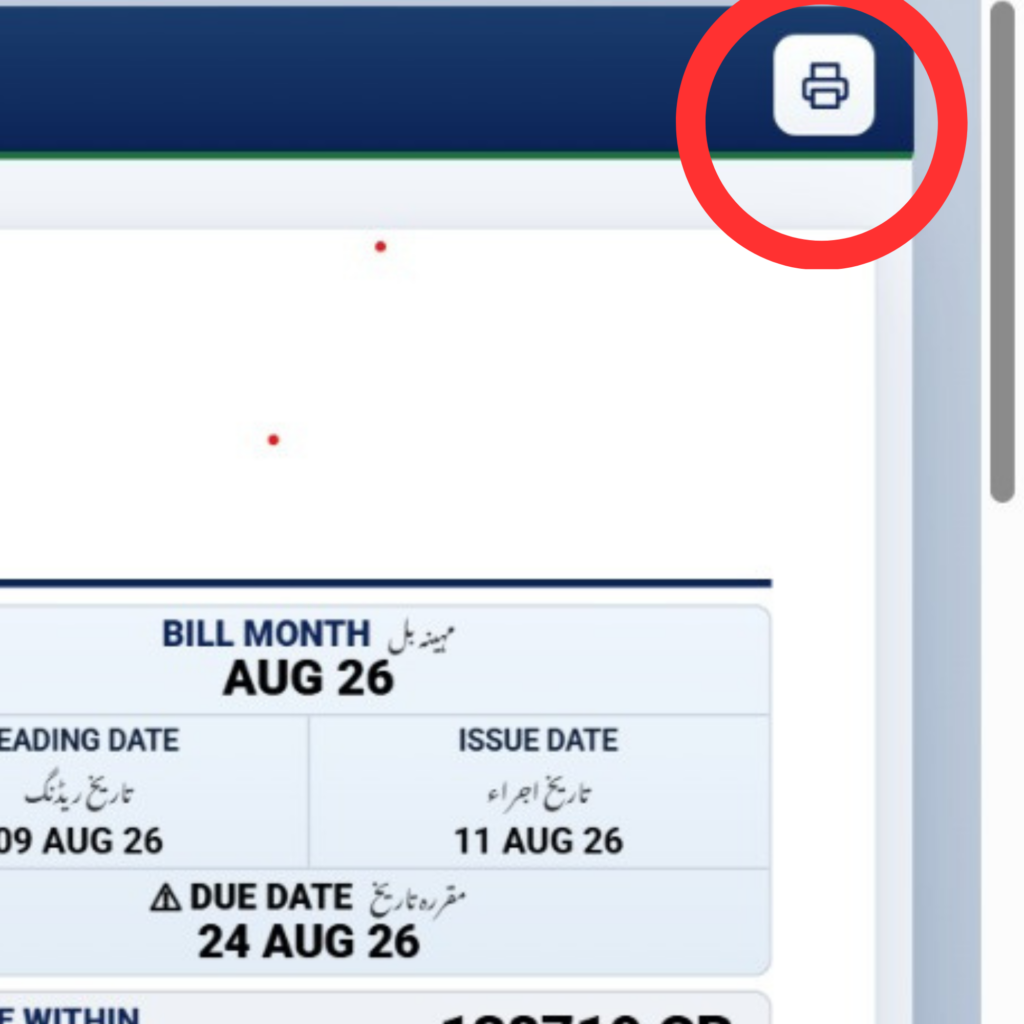
Step 3: Click the Print button shown at the top of the bill
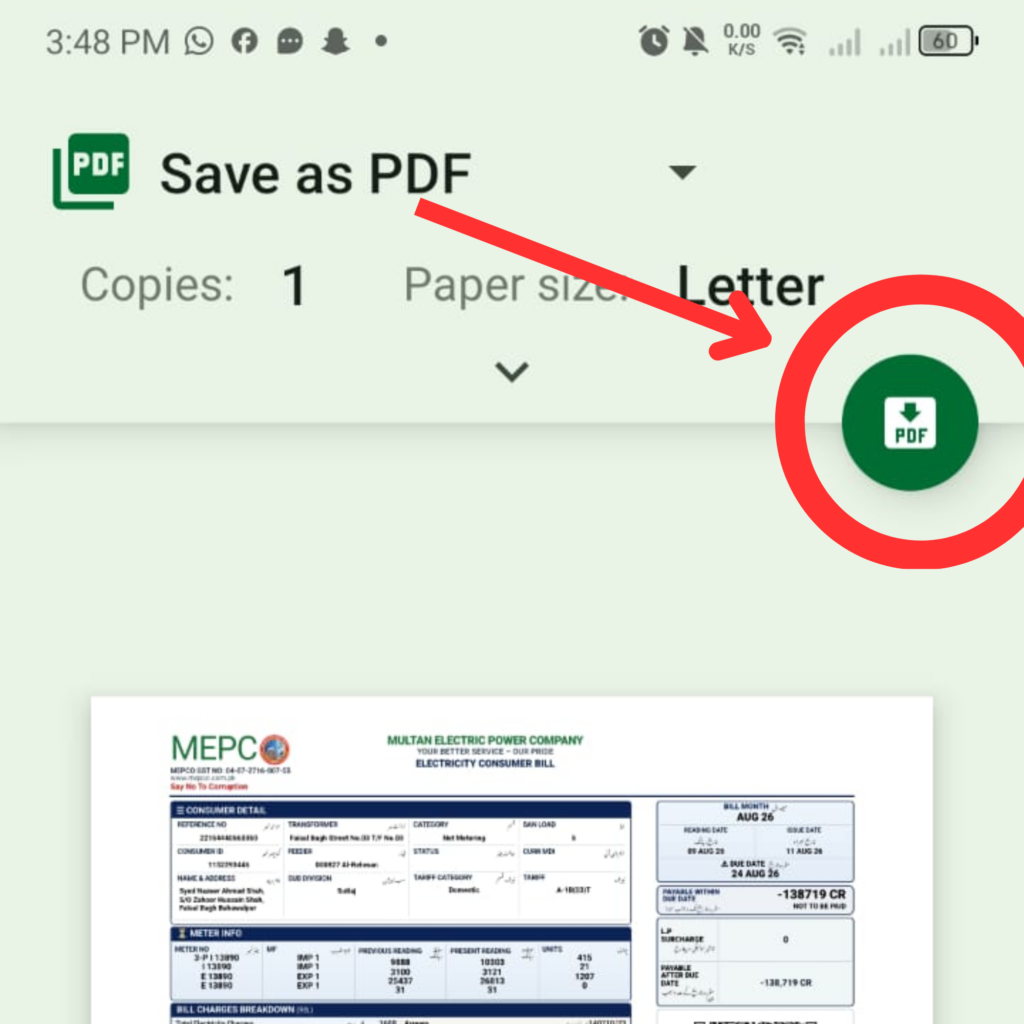
Step 4: In the print dialog, change the destination to Save as PDF
Step 5: Click Save — your duplicate electricity bill is now downloaded to your device
How to Print Your MEPCO Bill?
Once your bill is displayed on screen, printing is straightforward — click the print icon or use your browser’s print shortcut (Ctrl+P on most devices). Select your printer, confirm the paper size, and print. If you only need a soft copy for records or online payment, save it as a PDF instead of printing a physical copy.
How to Check MEPCO Old Bill History?
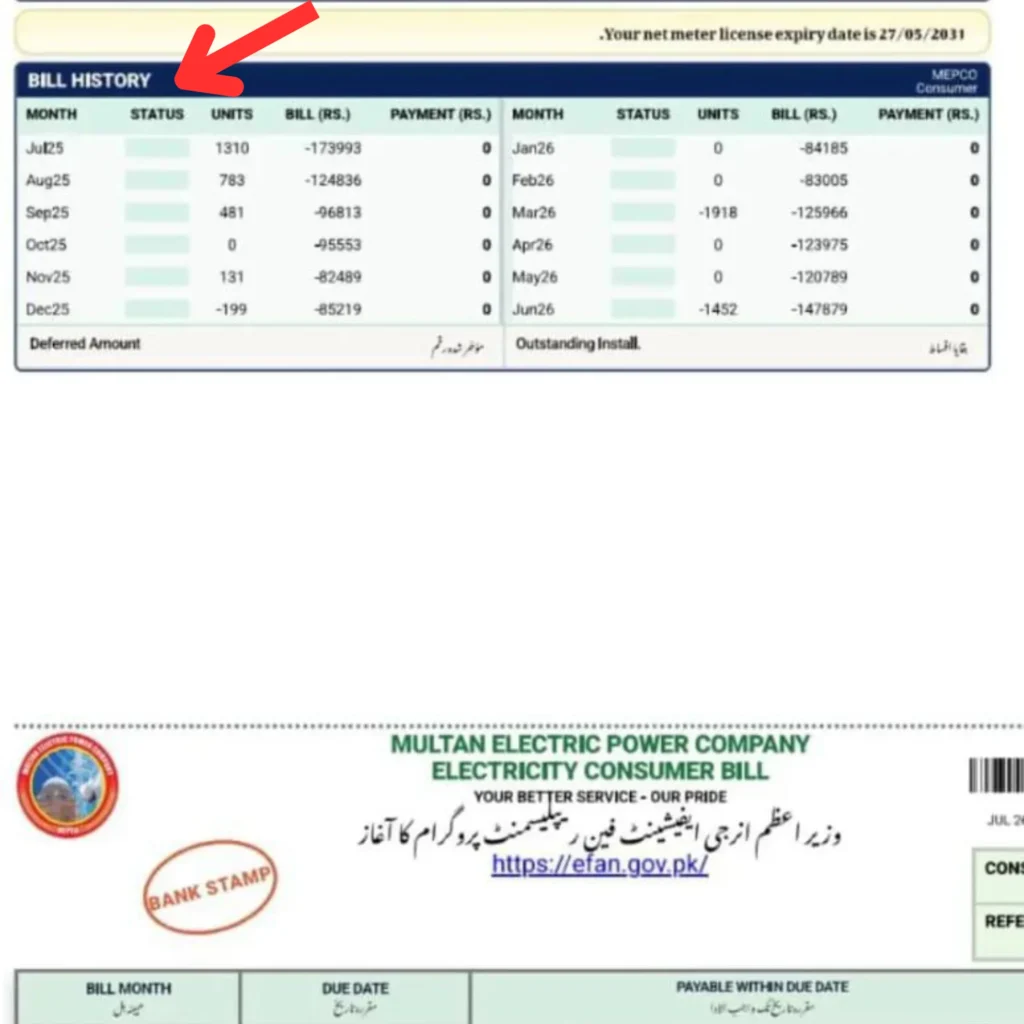
Your online bill contains entries of 12 months of bills. You can see the units consumed in any specific month, the amount for that month, and whether it was paid.
Step 1: Open the bill check portal and enter your reference number or consumer ID
Step 2: Generate your current bill
Step 3: Scroll to the bill history or previous bills section — this typically shows the last 12 months
Step 4: Review consumption patterns, amounts, and payment status for each month
💡 Tip: Regularly reviewing your bill history helps you track past bills, verify billing accuracy, and identify any unusual spikes in consumption early.
Understanding Every Charge on Your MEPCO Bill
MEPCO Bill Calculator — How to Estimate Your Bill?
The MEPCO bill calculator is a convenient tool that allows consumers to estimate their electricity bill before it is officially issued. By entering your unit consumption, the calculator factors in tariff rates, taxes, surcharges, and other applicable charges to give an accurate estimate.
Using the calculator, consumers can:
- Plan monthly electricity expenses effectively
- Monitor energy usage and identify high-consumption periods
- Compare past bills to spot trends or discrepancies
- Estimate costs for different appliances
FPA GST TV Fee and TR Surcharge Explained
Every bill includes several government-imposed taxes and charges. Understanding these helps you know exactly what you are paying for:
|
Charge |
Meaning |
|---|---|
|
FPA (Fuel Price Adjustment) |
Accounts for fluctuations in fuel costs used for electricity generation — reflects the real cost of production |
|
GST (General Sales Tax) |
Applied per government regulations on electricity consumption |
|
TV Fee |
A fixed 35 PKR per consumer to support Pakistan Television — currently shows zero on most bills but can be reinstated |
|
TR Surcharge |
Tariff Rationalization Surcharge — the power consumption difference between NEPRA and the Government of Pakistan, appearing as “IDTR SUR” |
Deferred Amount FC Surcharge QTR Adjustment and Pro Rata Consumption
|
Charge |
Meaning |
|---|---|
|
Deferred Amount |
Unpaid balances or adjustments carried from previous billing cycles |
|
FC Surcharge (Financing Cost Surcharge) |
A charge at the rate of 43 paise per unit to ensure repayment of PHPL dues |
|
QTR Tariff Adjustment |
A quarterly revision reflecting changes in fuel prices, generation cost, and other expenses |
|
Pro Rata Consumption |
A NEPRA rule where, if your meter reading is not done exactly on the due date, your bill is calculated based on the average of actual units consumed multiplied by 30 days — favoring the consumer and preventing overbilling |
MEPCO Peak Hours and How to Reduce Your Bill
MEPCO Peak Hours by Season — Full Time Table
Peak hours are the time period when electricity demand and consumption are highest, resulting in higher per-unit charges.
|
Season |
Peak Hours |
Off-Peak Hours |
|---|---|---|
|
December – February |
5:00 PM – 9:00 PM |
Remaining 20 hours |
|
March – May |
6:00 PM – 10:00 PM |
Remaining 20 hours |
|
June – August |
7:00 PM – 11:00 PM |
Remaining 20 hours |
|
September – November |
6:00 PM – 10:00 PM |
Remaining 20 hours |
Tips to Lower Your Electricity Bill During Peak Hours
- Avoid using heavy appliances like air conditioners, water heaters, and washing machines during peak hours
- Shift electricity usage to off-peak times whenever possible
- Replace old fans and bulbs with energy-efficient alternatives
- Turn off lights and unplug unused appliances
- Set your AC to 26°C for optimal efficiency
- Try to remain within the lower consumption slab to benefit from lower per-unit rates
How to Pay Your MEPCO Bill Online?
Pay via JazzCash
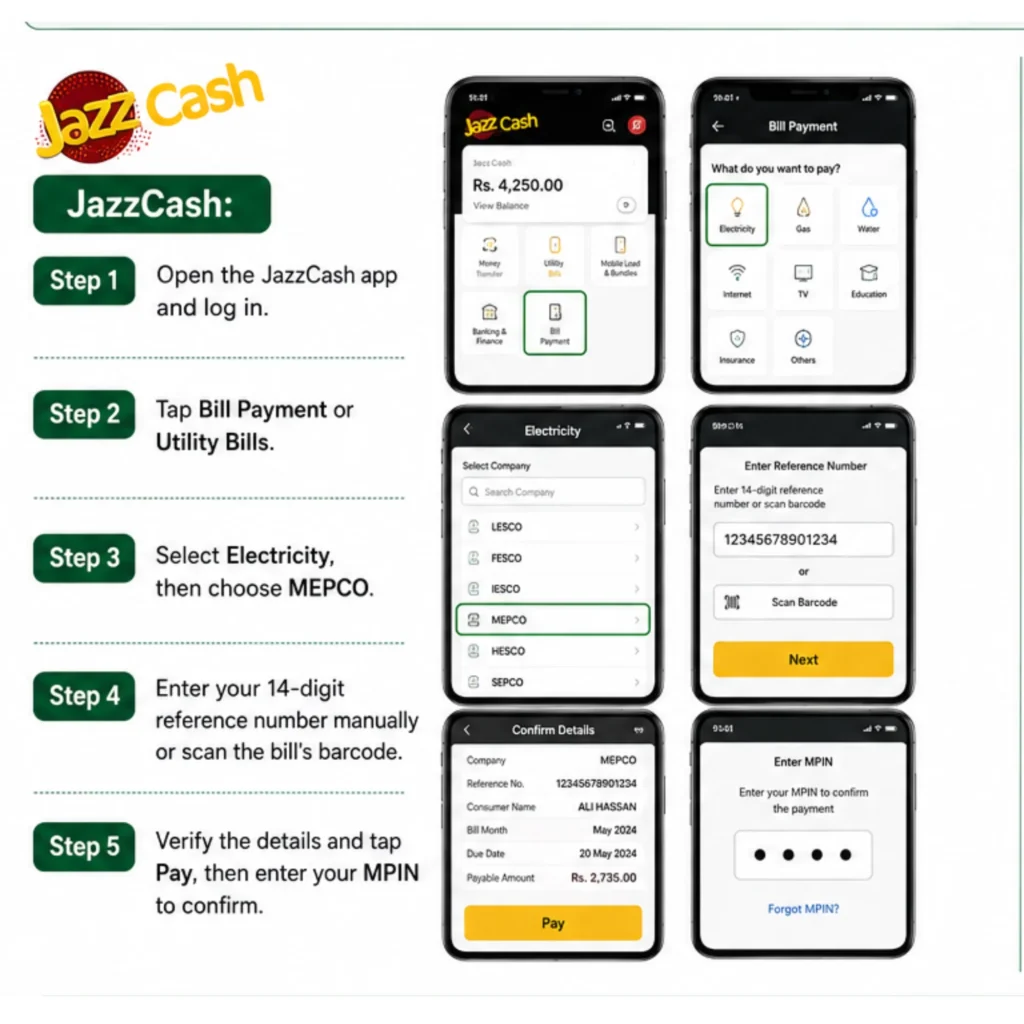
Step 1: Open the JazzCash app and log in
Step 2: Tap Bill Payment or Utility Bills
Step 3: Select Electricity, then choose MEPCO
Step 4: Enter your 14-digit reference number manually or scan the bill’s barcode
Step 5: Verify the details and tap Pay, then enter your MPIN to confirm
Pay via Easypaisa
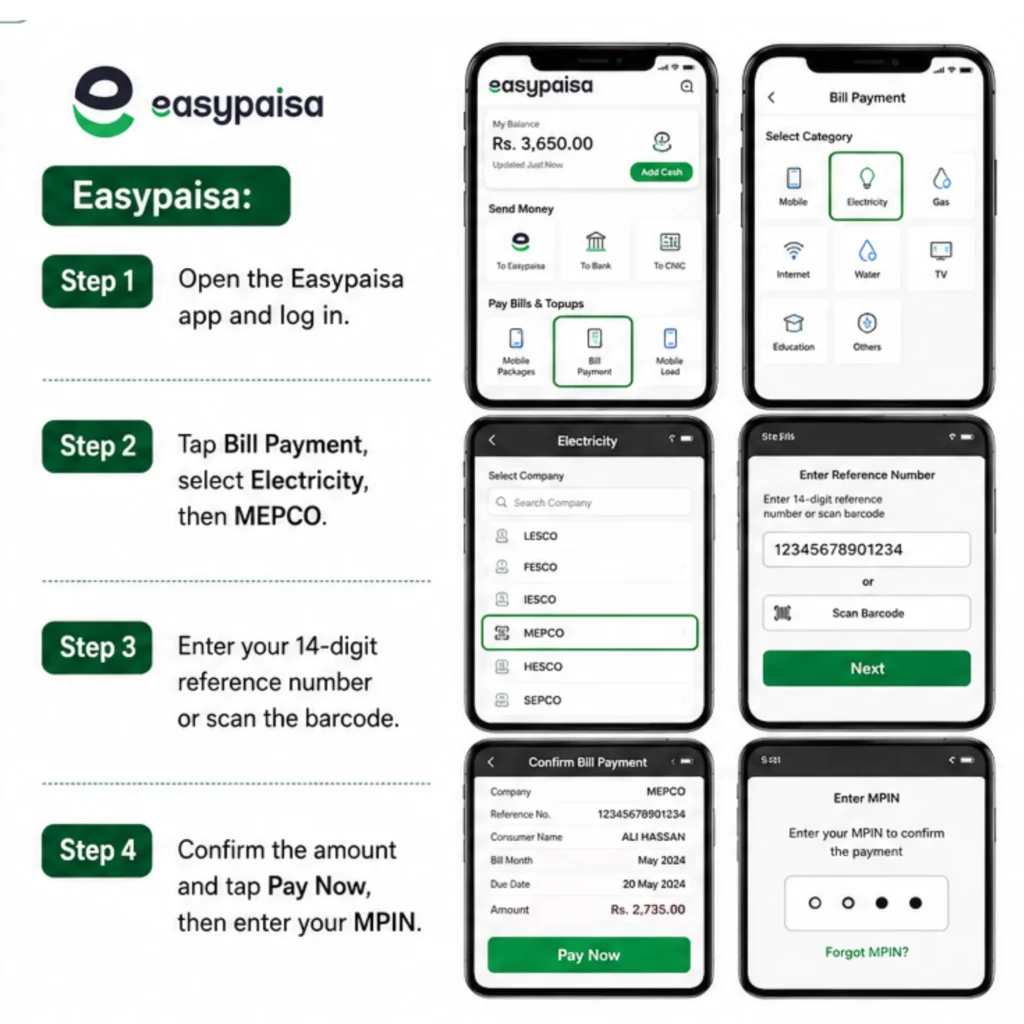
Step 1: Open the Easypaisa app and log in
Step 2: Tap Bill Payment, select Electricity, then MEPCO
Step 3: Enter your 14-digit reference number or scan the barcode
Step 4: Confirm the amount and tap Pay Now, then enter your MPIN
You will receive instant confirmation via the app and SMS with a transaction reference for your records.
Pay via Bank Apps and ATM
Most Pakistani banks — HBL, UBL, MCB, Meezan — support MEPCO bill payments through mobile apps and internet banking:
Step 1: Sign in to your bank app and go to the Pay Bill section
Step 2: Select MEPCO from the list of billing companies
Step 3: Enter your consumer bill number and the payable amount
Step 4: Confirm and complete the payment
For ATM payments, insert your card, navigate to Bill Payments, select MEPCO, enter your 14-digit reference number, and follow the prompts.
Pay via Over the Counter at Banks and Pakistan Post
Traditional counter payments are still accepted at bank branches, Pakistan Post offices, and NADRA e-Sahulat centers:
- Banks: Visit any bank branch that accepts MEPCO payments, provide your reference number, pay the amount, and collect a receipt
- Post Offices: Visit your nearest post office bill collection desk, provide your reference number, pay, and keep the receipt
- NADRA e-Sahulat Centers: Provide your reference number and amount to the operator and receive a transaction slip
MEPCO Bill Correction Complaints and Solar Net Metering
How to Report a Wrong Meter Reading Overbilling or Low Voltage
If you notice a wrong reading, overbilling, or a low voltage issue at your premises:
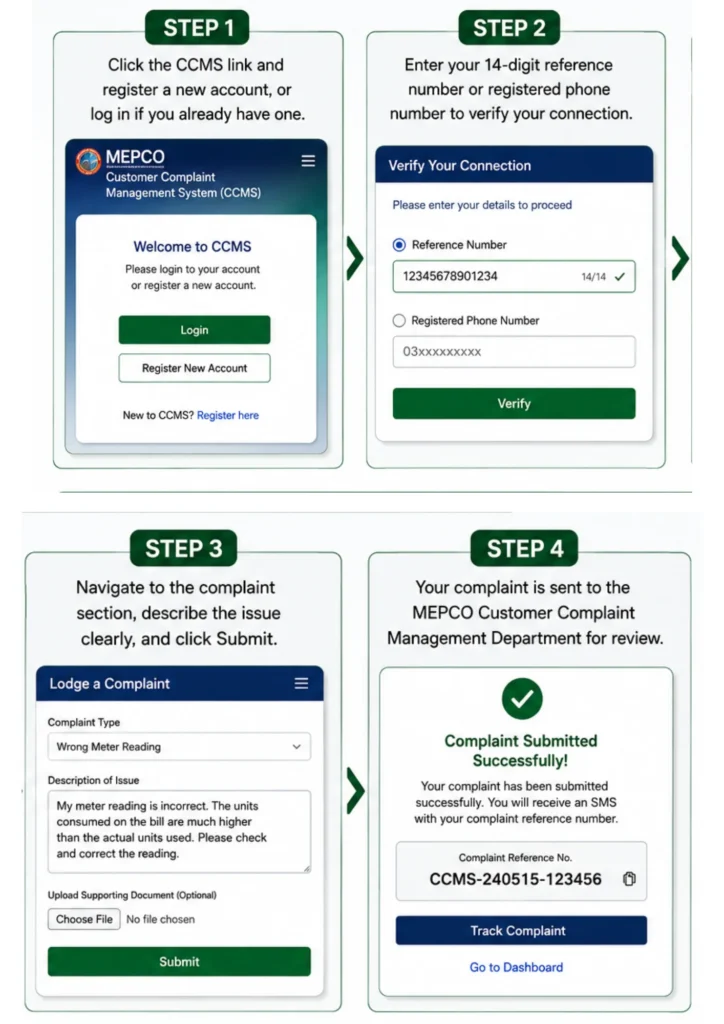
Step 1: Click the CCMS link and register a new account, or log in if you already have one
Step 2: Enter your 14-digit reference number or registered phone number to verify your connection
Step 3: Navigate to the complaint section, describe the issue clearly, and click Submit
Step 4: Your complaint is sent to the MEPCO Customer Complaint Management Department for review
For low voltage specifically, contact your local SDO complaint office without delay — this is treated as a priority technical issue rather than a billing complaint.
⚠️ Warning: If you encounter a fallen power line, do not approach it — contact the MEPCO helpline immediately for emergency assistance.
MEPCO Helpline and Regional Complaint Numbers by City
|
Contact Method |
Details |
|---|---|
|
Call Center |
118 — for billing complaints, load shedding, general queries |
|
SMS |
8118 — register complaints via text |
|
|
Regional helpline numbers by district:
|
# |
MEPCO District |
Helpline / Contact |
|---|---|---|
|
1 |
061-9220198 |
|
|
2 |
062-9250102 |
|
|
3 |
068-9230160 |
|
|
4 |
064-9239229 |
|
|
5 |
040-9200305 |
|
|
6 |
067-3360283 |
|
|
7 |
066-9200065 |
|
|
8 |
065-2550080 |
|
|
9 |
063-9239031 |
|
|
10 |
Lodhran |
0608-361245 |
|
11 |
Pakpattan |
0457-352218 |
|
12 |
Layyah |
0606-413100 |
|
13 |
Rajanpur |
0604-688222 |
The complaint process begins within 24 hours of filing, and cases are usually resolved within 14 days. You can track your complaint status by entering your reference number in the CCMS complaint tracking section.
MEPCO Net Metering for Solar Panel Owners
MEPCO consumers with rooftop solar systems can apply for net metering under NEPRA regulations. When your solar system generates more power than you consume, excess units are exported to the grid and credited against future bills.
To apply: submit a written application at your Sub-Division office with your CNIC, latest bill, and meter photographs. MEPCO staff will inspect the meter, issue a demand notice with applicable charges, and schedule installation.
⚠️ Warning: Pakistan’s solar export policy was updated in 2026. If you are planning a new solar installation, verify the latest net metering procedures with MEPCO or NEPRA before investing, as compensation rates and application requirements may have changed.
MEPCO Bill Installment and Due Date Extension
How to Apply for MEPCO Bill Installments?
Consumers facing financial difficulty can apply for bill installments:
Step 1: Visit your local MEPCO office or regional customer service center
Step 2: Fill out the application form for bill installments with valid reasons for financial difficulty
Step 3: Attach supporting documents — CNIC, latest electricity bill, proof of income or financial hardship
Step 4: MEPCO staff verify your account, consumption history, and submitted documents
Step 5: If approved, you receive a payment schedule outlining monthly installment amounts
MEPCO Bill Installment Limits by Bill Amount
|
Competent Officer |
Installment Plan |
|---|---|
|
SDO / AM(O) |
3 monthly installments for bills up to Rs. 50,000 |
|
RO / AM(CS) |
3 monthly installments for bills up to Rs. 50,000 |
|
XEN / DM(O) |
3 monthly installments for bills up to Rs. 200,000 |
|
SE / Manager(O) |
4 monthly installments for bills up to Rs. 500,000 |
|
Director Commercial |
5 monthly installments for bills up to Rs. 1,000,000 |
|
CSD |
12 monthly installments for bills up to Rs. 20 Million |
How to Request a Due Date Extension?
MEPCO also allows you to request an extension of your bill due date if you face financial hardship or did not receive the bill on time.
|
Competent Officer |
Extension Allowed |
|---|---|
|
SDO / AM(O) |
Maximum 3 days for bills up to Rs. 50,000 |
|
RO / AM(CS) |
Maximum 3 days for bills up to Rs. 50,000 |
|
XEN / DM(O) |
Maximum 3 days for bills up to Rs. 200,000 |
|
SE / Manager(O) |
Maximum 5 days for bills up to Rs. 500,000 |
|
Director Commercial |
Maximum 5 days for bills up to Rs. 1,000,000 |
|
CSD |
Maximum 8 days for bills up to Rs. 20 Million |
⚠️ Warning: Due date extensions are not guaranteed and are evaluated case by case depending on the officer’s discretion and your specific circumstances. Submit your request as early as possible before the due date passes.
Frequently Asked Questions About MEPCO Bill Online
About the Author
Sayedah Meh Para Basheer is an SEO specialist and content writer based in South Punjab, Pakistan, with hands-on experience in electricity billing, NEPRA tariff policy, and consumer rights across the MEPCO service area. She created this website to give South Punjab’s 7.5 million electricity consumers a reliable, jargon-free resource for understanding their MEPCO bill — from reading the FPA line correctly to navigating the Cross Subsidy Program and filing CCMS complaints.
Every article on this site is written from verified sources: NEPRA official notifications, PITC billing data, and MEPCO’s own operational records. When a tariff changes, a new policy lands, or a billing issue affects large numbers of consumers across Multan, Bahawalpur, or Rahim Yar Khan — it is covered here first.
Conclusion
Checking your MEPCO bill online in 2026 takes only seconds once you have your 14-digit reference number or 10-digit consumer ID ready. Use the SMS service if you lack internet access, pay conveniently through JazzCash, Easypaisa, or your bank app, and don’t hesitate to apply for an installment plan or due date extension if you are facing financial difficulty. Keep your bills stored safely, understand the charges listed on your statement, and report any meter reading discrepancies promptly through the CCMS complaint system to keep your account accurate and your electricity supply uninterrupted.